What is the QR Code on RYOBI Product?
Some RYOBI products include a QR code that gives you quick access to helpful post-purchase support information.
Simply scan the QR code using your smartphone camera to access a range of product support resources, which may include:
- Product support articles
- Getting started guides
- How-to videos
- Product manuals
- Accessories
- Product registration
- Warranty information
- Contact and support options
How do I scan the QR Code?
Most smartphones can scan QR codes directly through the camera app.
- Open your phone's camera.
- Point it at the QR code on your product.
- Tap the notification that appears on your screen.
- Follow the link to access product support information.
Where can I find the QR Code?
Depending on the product, the QR code may be located on:
- The product itself
- A swing tag
- Product packaging
- The user manual
Not all RYOBI products currently include a customer-facing QR code.
I found a small square 2D Code. Why won't it scan?
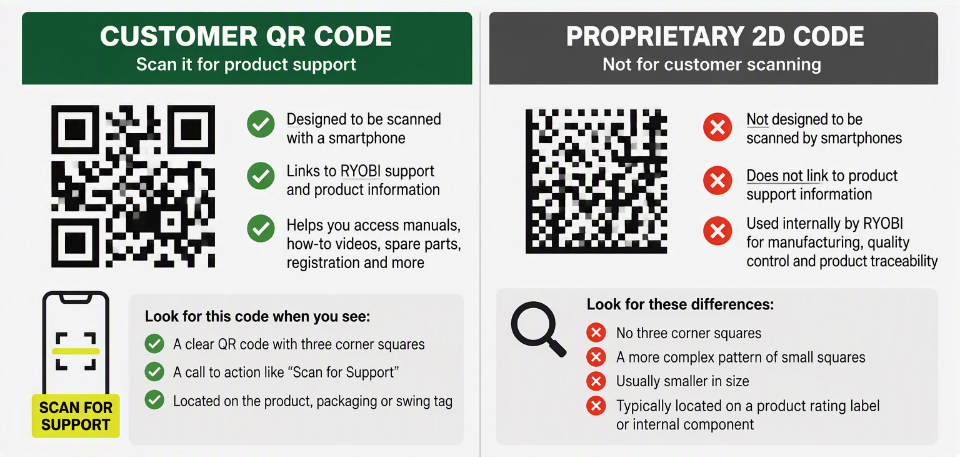
Some RYOBI products include a small 2D code that looks similar to a QR code.
This code is not a customer support QR code and is not designed to be scanned by smartphones.
The 2D code is a proprietary manufacturing and traceability code used by RYOBI to:
- Identify products
- Assist with quality control
- Support manufacturing and service processes
- Trace products through our supply chain
Because this code uses an internal format, most smartphones and consumer QR code scanners cannot read it.
How can I tell the difference?
Can't find a QR Code?
If your product does not include a QR code, you can still access support resources by visiting the RYOBI Support Centre.
Here you'll find:
- Product manuals
- Troubleshooting articles
- Accessories information
- Warranty support
- Product registration
If you need further assistance, please contact the RYOBI Customer Service team on 1300 697 962 for assistance.
All