SEARCH
Enter keywords, product name, or question
- Power off and remove the battery
Switch the unit off and remove the battery to ensure it cannot start during cleaning.
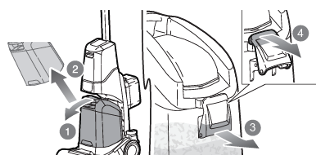
Empty the dirty water tank & Rinse
Do not allow the liquid to exceed the max fill line, as it can enter the motor and cause damage.
- To Remove the dirty tank, pull the tank forward and out
- Then to unlock the tank, pull the lever located on the front of the dirty water tank; out and up.
- Empty the dirty water out
- Rinse the tank with clean water to remove any dirt and residue.
Ensure it is fully empty before reinstalling or storing.
Clean the filter
- Locate the filter under the lid of the Dirty water tank.
- To remove filter; turn the filter clockwise to unlock and pull off.
- Clean the filter with a brush
- When the filter is clean and fully dry; re-install by pushing into position and turning anticlockwise to lock.
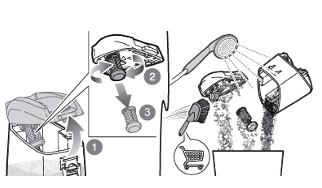
Allow it to fully dry before reinstalling to maintain suction performance.
Clean the brush roll
- To remove the brush roll, first ensure that the dirty water tank is removed.
- Then pull up on the back of the floor head cover, to remove it.
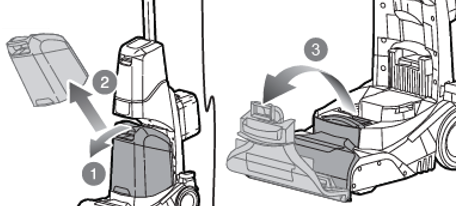
- Pull out the Brush roll by pulling on the left hand side of the Brush roll.
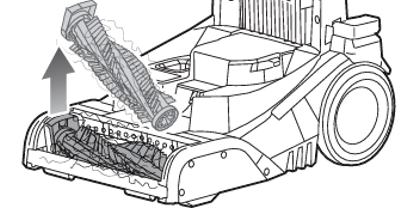
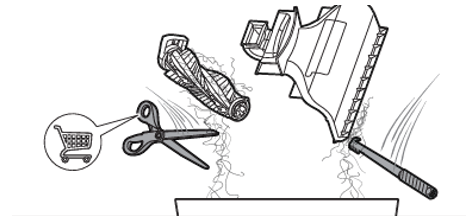
- Remove any hair by cutting it off carefully, and using the cleanout tool to remove any dirt build up in the cover and/or the brush.
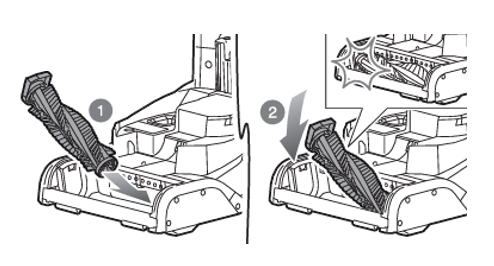
- When completely dry; reinsert the brush, by first slotting in the right hand side, then clipping in the left.
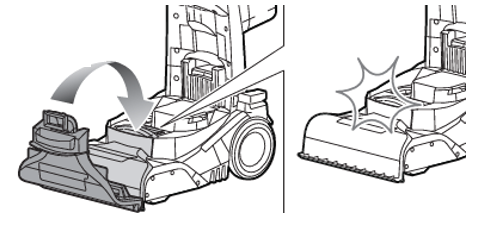
- Then clip the brush cover back into position by lining up the front of the cover with the unit and the clipping in position.
If storing long-term, keep the battery removed.
Following this routine after each use will maintain cleaning performance and extend the life of the carpet washer.
RCW18X